
Zumiez sales teams waste critical time between fragmented systems for sales, inventory, and closing reports. Zumiez Connect unifies these legacy tools into a single dashboard!
Role: Lead UX Designer (Research to Prototyping)
Context: 10-Week Academic/Quarter Project
Zumiez sales teams waste critical time between fragmented systems for sales, inventory, and closing reports. Zumiez Connect unifies these legacy tools into a single dashboard!
Role: Project Lead
Context: 10-Week Academic Project
The problem
The problem
Zumiez store teams handled customer service while juggling four different disconnected legacy tools:
POS Transactions (Engage App)
Inventory Scanning/Tracking (Sold 2.0 app)
Closing Reports (Manual paperwork)
Manager Communication (Siloed emails)
Zumiez store teams handled customer service while juggling four different disconnected legacy tools:
POS Transactions (Engage App)
Inventory Scanning/Tracking (Sold 2.0 app)
Closing Reports (Manual paperwork)
Manager Communication (Siloed emails)
THE USERS & PAIN POINTS
THE USERS & PAIN POINTS
THE USERS & PAIN POINTS
Sales Associates
The Hustle: Managing long lines with zero real-time stock visibility
The Friction: Must physically look for product to check for stock
2. Store Managers
The Hustle: Managing the floor while handling administrative overhead
The Friction: Spending hours manually calculating sales efficiency by hand and after the store closes
Sales Associates
The Hustle: Managing long lines with zero real-time stock visibility
The Friction: Must physically look for product to check for stock
2. Store Managers
The Hustle: Managing the floor while handling administrative overhead
The Friction: Spending hours manually calculating sales efficiency by hand and after the store closes
USABILITY TESTING RESULTS
We ran walkthroughts simulating high-stress retail scenarios. Users reported:
Fewer navigation steps to log missing tags.
Faster checkout speeds because inventory alerts live inside the dashboard
Zero manual math needed for closing reports.
We ran walkthroughts simulating high-stress retail scenarios. Users reported:
Fewer navigation steps to log missing tags.
Faster checkout speeds because inventory alerts live inside the dashboard
Zero manual math needed for closing reports.
Initial design flows
Employee Login
DASHBOARD
TIMECARD
CLOCK
IN / OUT
SMART BREAK
alerts
POINT OF SALES
TRANSACT-
IONS
TASK CENTER
TASK
ASSIGNMENT
EXECUTE
TASK
INVENTORY
SKU CHECK
& STOCK
ONLNINE
FULFILMENT
this flow helped us understand the concept of "One unified dahsboard"
USER RESEARCH & INSIGHTS
Utilization of user centered qualitative research approach
2 Semi-structured Interviews with Zumiez Store Managers from two different storefronts.
4 On-site Contextual Inquiries with active sales associates to observe live workflows, inventory procedures, and closing tasks.
Utilization of user centered qualitative research approach
2 Semi-structured Interviews with Zumiez Store Managers from two different storefronts.
4 On-site Contextual Inquiries with active sales associates to observe live workflows, inventory procedures, and closing tasks.
CRITICAL INSIGHTS
Revealed 3 critical insights!
High Cognitive Load
Associates bounce between 3+ interfaces/screens while interacting with customers
Broken Omni-channel Flow
Online orders are fulfilled by storefronts. Because tracking is manual, stolen or misplaced items stay listed as "in stock," leading to cancelled customer orders.
Closing is a bottleneck:
"For some reason, we do a lot of the closing procedure by hand." - Store Manager
Revealed 3 critical insights!
High Cognitive Load
Associates bounce between 3+ interfaces/screens while interacting with customers
Broken Omni-channel Flow
Online orders are fulfilled by storefronts. Because tracking is manual, stolen or misplaced items stay listed as "in stock," leading to cancelled customer orders.
Closing is a bottleneck:
"For some reason, we do a lot of the closing procedure by hand." - Store Manager
USABILITY TESTING RESULTS
We ran walkthroughts simulating high-stress retail scenarios. Users reported:
Fewer navigation steps to log missing tags.
Faster checkout speeds because inventory alerts live inside the dashboard
Zero manual math needed for closing reports.
We ran walkthroughts simulating high-stress retail scenarios. Users reported:
Fewer navigation steps to log missing tags.
Faster checkout speeds because inventory alerts live inside the dashboard
Zero manual math needed for closing reports.
Iteration: Cleaning the clutter
Our initial wireframes failed user testing because they were too dense
*insert image of lowfi v1 vs v2 here*
The Two Major Pivots:
Contextual Hierarchy: We made the closing/reporting tools hidden during morning shift but prominent during closing hours
Visual Urgency: High-priority inventroy errors and online order fulfillment needs were given high-contrast alert badges to catch eyes during user interaction.
Our initial wireframes failed user testing because they were too dense
*insert image of lowfi v1 vs v2 here*
The Two Major Pivots:
Contextual Hierarchy: We made the closing/reporting tools hidden during morning shift but prominent during closing hours
Visual Urgency: High-priority inventroy errors and online order fulfillment needs were given high-contrast alert badges to catch eyes during user interaction.
INITIAL prototype


Main dashboard: Simplified Dashboard with the three main functions
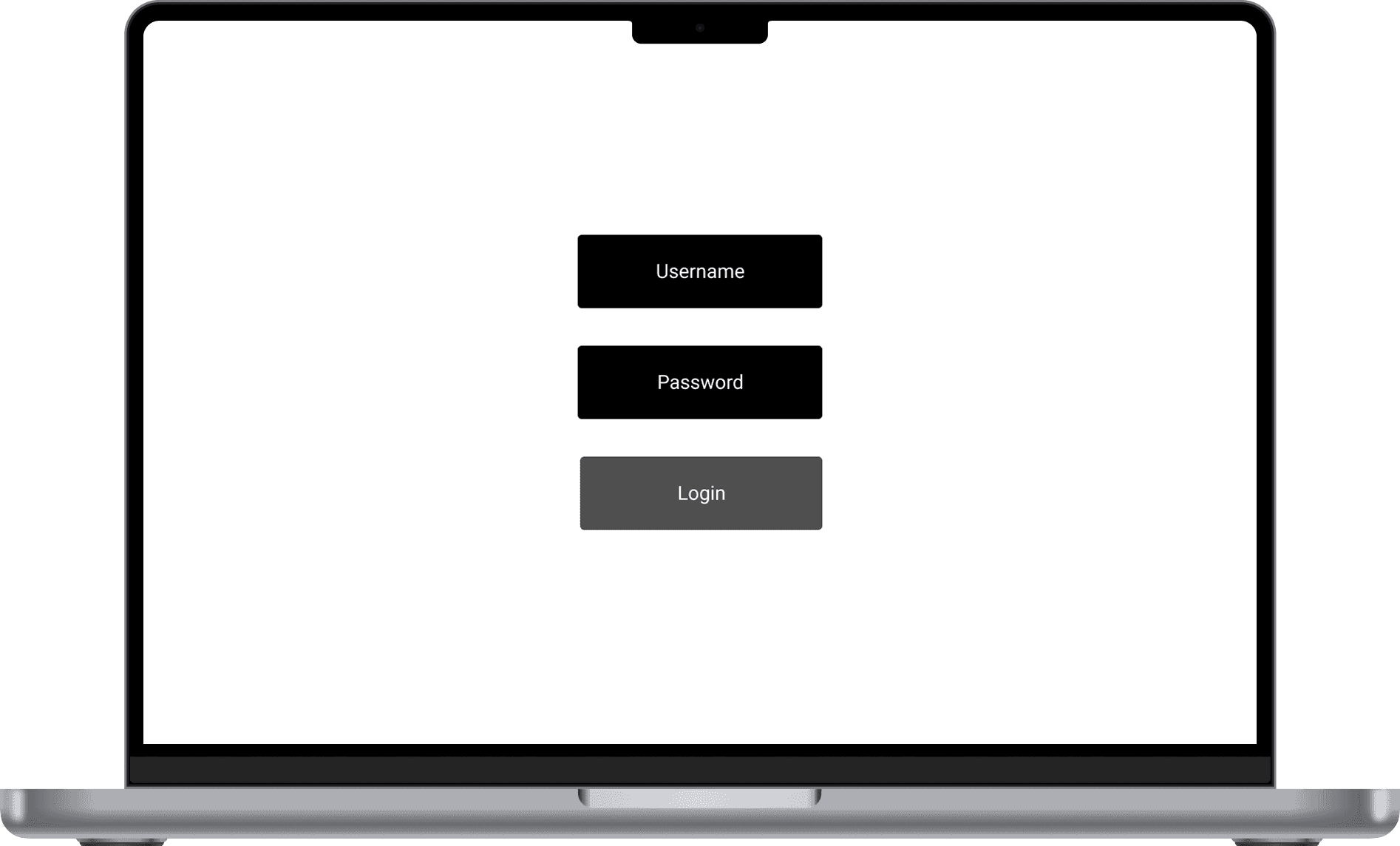
Login: Employees are greeted with only one login screen as opposed to logging into multiple interfaces
Login: Employees are greeted with only one login screen as opposed to logging into multiple interfaces

Task Center Dashboard: Provies clear visibility of daily priorities
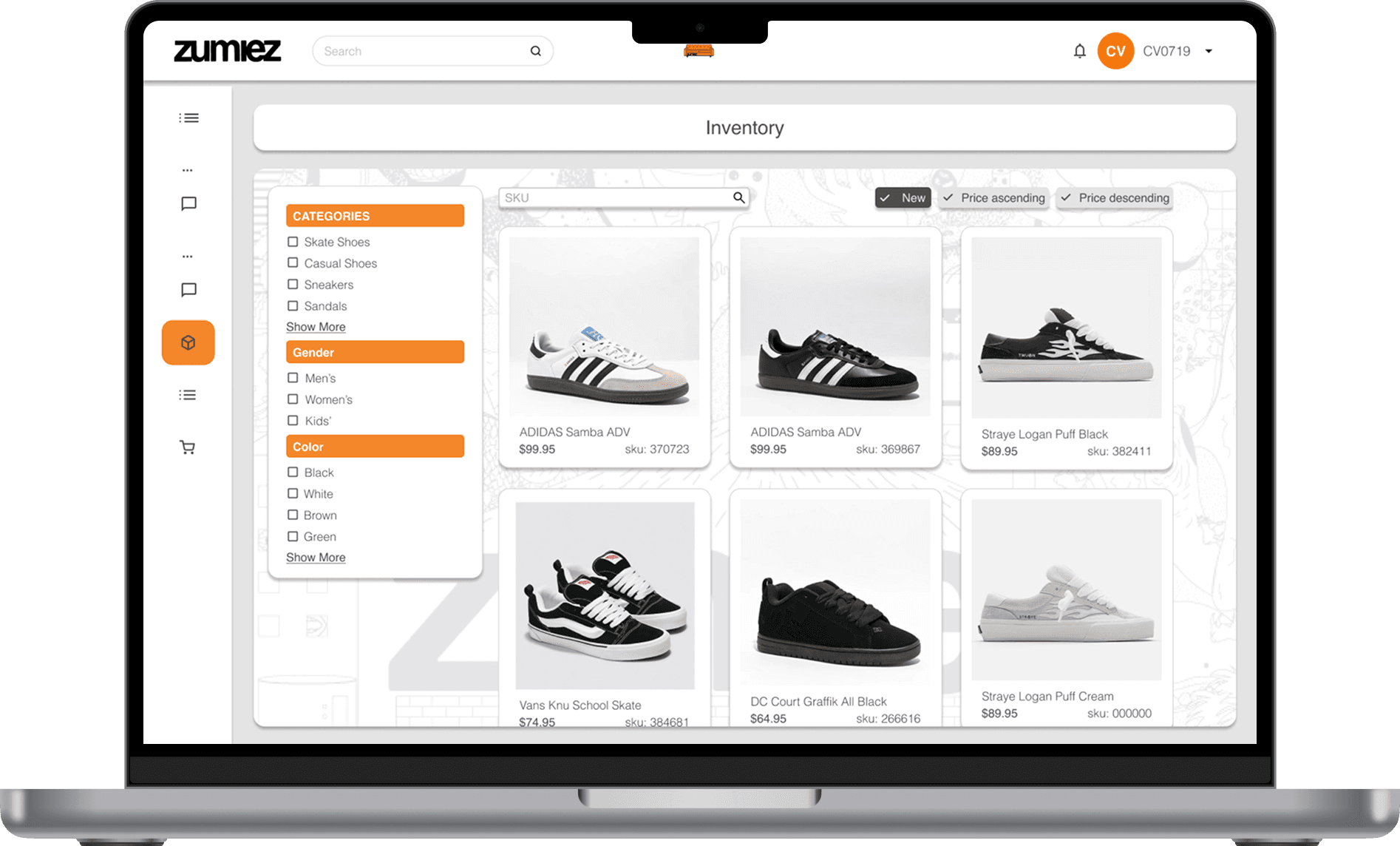
Inventory Center: Track, update, and manage inventory with ease.
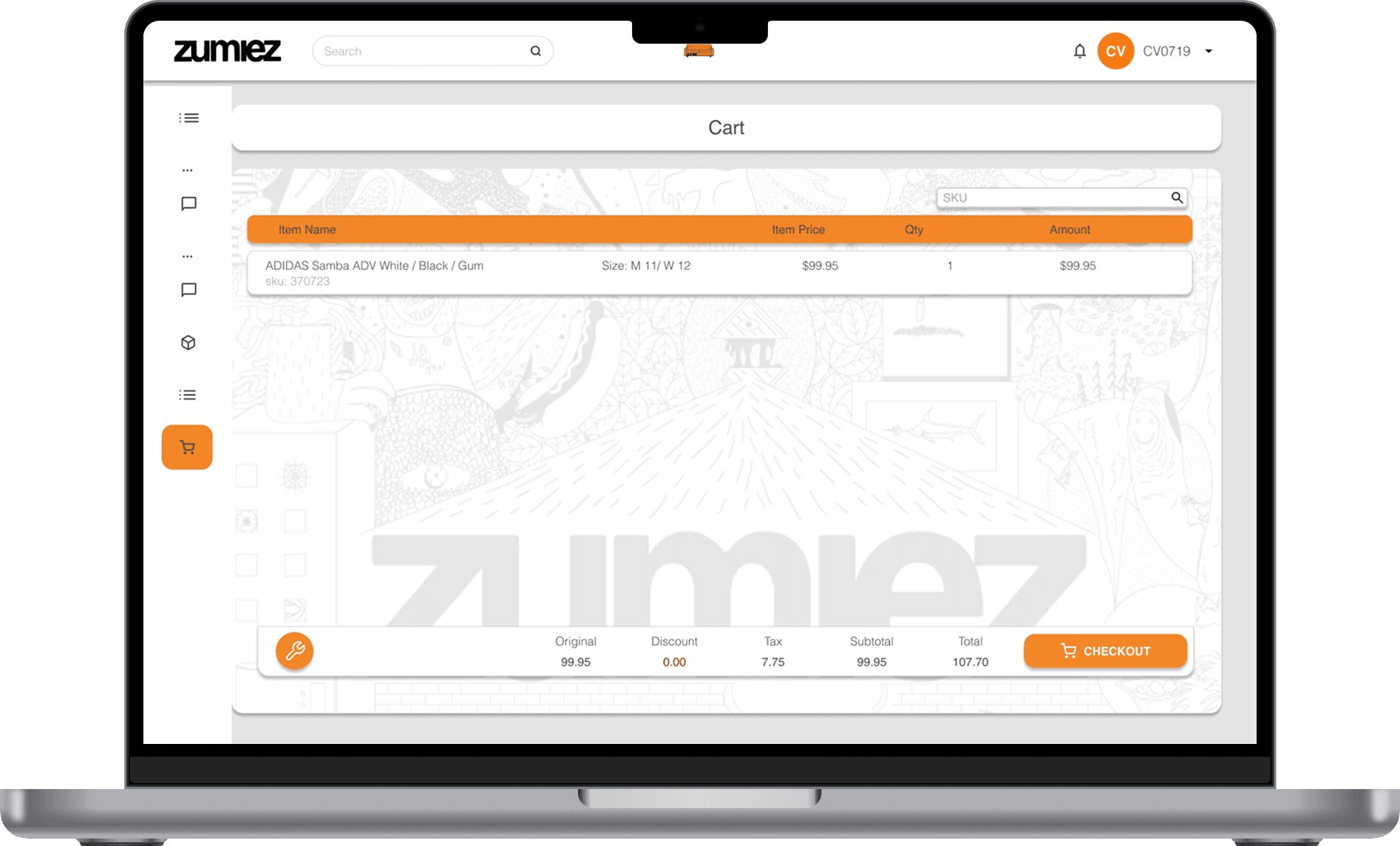
POS: Streamlines checkout to help employees serve customers with more efficiency.
*insert 3 polished High-Fi screens here
Main dashboard: Consolidated sales metrics, tasks, and live alerts
Automated Reporting: One-click closing reports populated with automated POS data
Live Inventory Alerts: Instant warnings regarding stock discrepancies
Main dashboard
REFLECTION
What I've learned from this project!
Consumer apps want engagnement; while enterprise tools want efficiency. Every extra button or step becomes a liability during store rushes
Desgin for Physical Chaose: A UI that works in a quiet room can fail on a loud, busy weekend shift. Interfaces must adapt to the user's real-world environment and time constraints
UX Impacts Employe Moral: When a system is slow or inventory is wrong, front-line staff absorb the customer's frustrations. Good UX actively lowers an employees stress
Respect System Constraints: Real-world product design isnt about building smart layers that connect existing legacy data.

Main dashboard: Quick access to inventory, tasks, and store insights in one centralized location
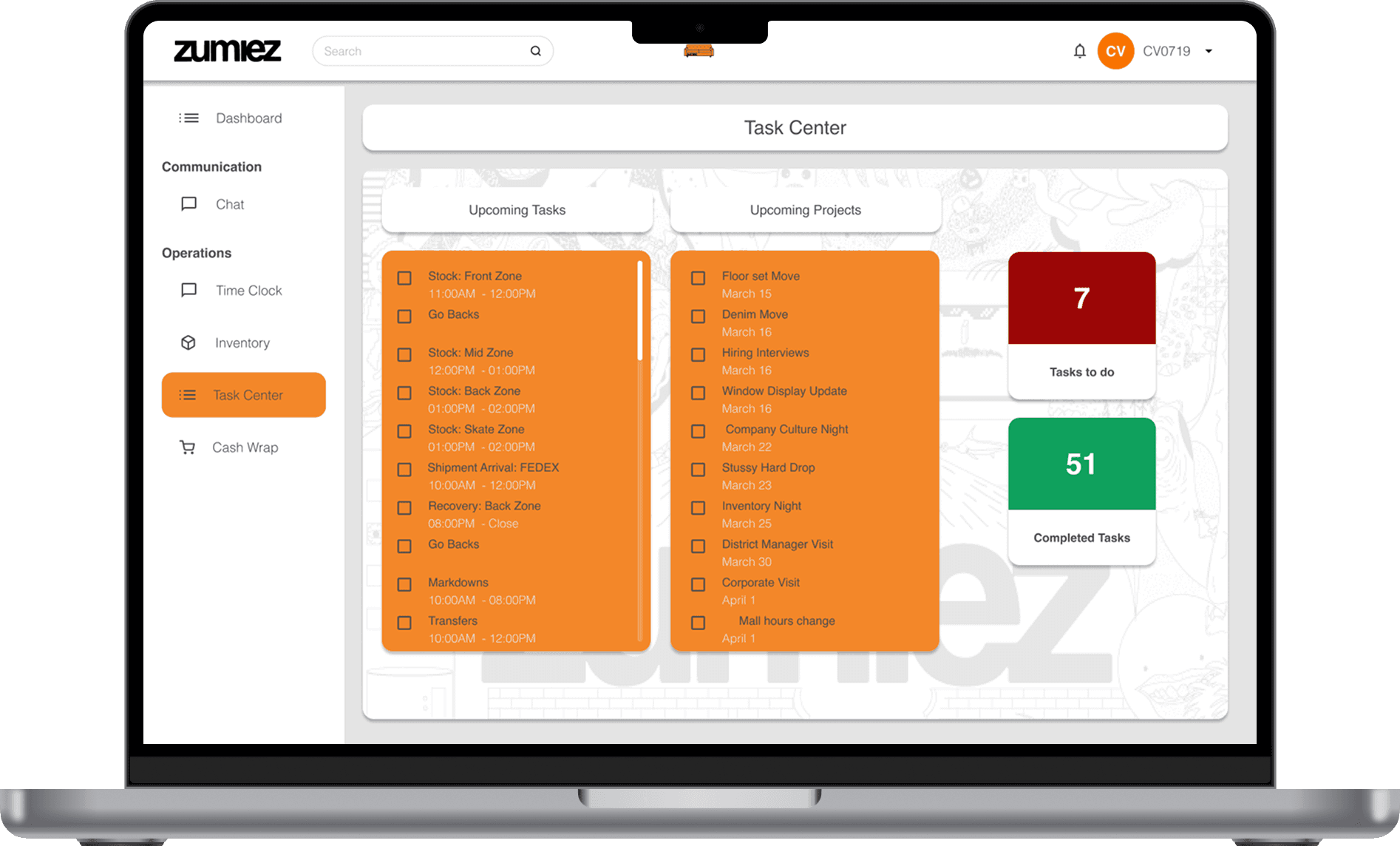
Task Center: Removal of the extra step to provide workers wtih clear visibility of daily priorities
Inventory Center: Track, update, and manage inventory with ease.
POS: Streamlines checkout to help employees serve customers with more efficiency.
*insert 3 polished High-Fi screens here
Main dashboard: Consolidated sales metrics, tasks, and live alerts
Automated Reporting: One-click closing reports populated with automated POS data
Live Inventory Alerts: Instant warnings regarding stock discrepancies
*insert 3 polished High-Fi screens here
Main dashboard: Consolidated sales metrics, tasks, and live alerts
Automated Reporting: One-click closing reports populated with automated POS data
Live Inventory Alerts: Instant warnings regarding stock discrepancies
Main dashboard
REFLECTION
What I've learned from this project!
Consumer apps want engagnement; while enterprise tools want efficiency. Every extra button or step becomes a liability during store rushes
Desgin for Physical Chaose: A UI that works in a quiet room can fail on a loud, busy weekend shift. Interfaces must adapt to the user's real-world environment and time constraints
UX Impacts Employe Moral: When a system is slow or inventory is wrong, front-line staff absorb the customer's frustrations. Good UX actively lowers an employees stress
Respect System Constraints: Real-world product design isnt about building smart layers that connect existing legacy data.
Contact me via email
christianvirata@gmail.com
christianvirata.ux